
Chapter 10: Interactive Features
Contents
10.1 Destinations
A destination defines a particular view of a document, consisting of the following:
- The page of the document to be displayed;
- The location of the document window on that page;
- The magnification (zoom) factor to use when displaying the page.
A destination is represented by the PdfDest object creatable via PdfDocument's CreateDest method, or alternatively, via PdfPage's CreateDest method. Both CreateDest methods take an optional parameter object or parameter string as an argument.
Once a destination object is created, it can be assigned to PdfDocument's OpenAction property which controls which part of the document is to be displayed, and at what zoom factor, when the document is opened. A destination object can also be assigned to an outline item, annotation or action (all described below).
A destination created with no parameters, or with the Fit parameter set to True, displays a page magnified just enough to fit the entire page both horizontally and vertically:
PdfDest objDest = objPage.CreateDest("Fit=true");
A destination created with the FitH parameter set to True displays a page magnified just enough to fit the entire width of the page within the window. An optional Top parameter specifies the vertical position of the page to be displayed at the top edge of the window:
PdfDest objDest = objPage.CreateDest("FitH=true; Top=100");
Similarly, a destination created with the FitV parameter set to True displays a page magnified just enough to fit the entire height of the page within the window. An optional Left parameter specifies the horizontal position of the page to be displayed at the left edge of the window:
PdfDest objDest = objPage.CreateDest("FitV=true; Left=130");
A destination created with the XYZ parameter set to True and additional optional parameters Left, Top and Zoom displays page with the coordinates (Left, Top) positioned at the top-left corner of the window and the content of the page magnified by the factor Zoom. A Zoom value of 1 means 100%, 2 - 200%, etc.
A destination created with the FitR parameter set to True and additional required parameters Left, Bottom, Right and Top displays a page magnified just enough to fit the rectangle specified by [Left, Bottom, Right, Top] entirely within the window both horizontally and vertically:
A destination created with the FitB parameter set to true displays a page magnified enough to fit its bounding box entirely within the window both horizontally and vertically. The FitB parameter can be used stand-alone as well as in conjunction with FitH and FitV parameters:
PdfDest objDest = objPage.CreateDest("FitB=true; FitV=true; Left=130");
The following code sample creates a document with gridlines, and sets the document's OpenAction property to various destinations based on passed URL parameters:
// Create empty document
PdfDocument objDoc = objPdf.CreateDocument();
// Add a new page
PdfPage objPage = objDoc.Pages.Add();
// Select one of the standard PDF fonts
PdfFont objFont = objDoc.Fonts["Helvetica"];
// vertical grid
for( float x = 0; x < objPage.Width; x += objPage.Width / 20 )
{
objPage.Canvas.DrawLine( x, 0, x, objPage.Height );
objPage.Canvas.DrawText( x.ToString(), "angle=90;y=5;x=" + x.ToString(), objFont );
}
// horizontal grid
for( float y = 0; y <= objPage.Height; y += objPage.Height / 20 )
{
objPage.Canvas.DrawLine( 0, y, objPage.Width, y );
objPage.Canvas.DrawText( y.ToString(), "x=5;y=" + y.ToString(), objFont );
}
// Create destination based on URL param
PdfParam objParam = objPdf.CreateParam();
if( Request["FitV"] != null )
{
objParam["FitV"] = 1; // true
objParam["Left"] = float.Parse(Request["Left"]);
}
if( Request["FitH"] != null )
{
objParam["FitH"] = 1;
objParam["Top"] = float.Parse(Request["Top"]);
}
if( Request["XYZ"] != null )
{
objParam["XYZ"] = 1;
objParam["Top"] = float.Parse(Request["Top"]);
objParam["Left"] = float.Parse(Request["Left"]);
objParam["Zoom"] = float.Parse(Request["Zoom"]);
}
PdfDest objDest = objPage.CreateDest( objParam );
// Assign destination to Doc's OpenAction
objDoc.OpenAction = objDest;
// Save document to HTTP stream
objDoc.SaveHttp( "attachment;filename=destdemo.pdf" );
' Create empty document
Dim objDoc As PdfDocument = objPdf.CreateDocument()
' Add a new page
Dim objPage As PdfPage = objDoc.Pages.Add()
' Select one of the standard PDF fonts
Dim objFont As PdfFont = objDoc.Fonts("Helvetica")
' vertical grid
For x As Single = 0 To objPage.Width step objPage.Width / 20
objPage.Canvas.DrawLine( x, 0, x, objPage.Height )
objPage.Canvas.DrawText( x.ToString(), "angle=90;y=5;x=" + x.ToString(), objFont )
Next
' horizontal grid
For y As Single = 0 to objPage.Height step objPage.Height / 20
objPage.Canvas.DrawLine( 0, y, objPage.Width, y )
objPage.Canvas.DrawText( y.ToString(), "x=5;y=" + y.ToString(), objFont )
Next
' Create destination based on URL param
Dim objParam As PdfParam = objPdf.CreateParam()
If Request("FitV") <> Nothing Then
objParam("FitV") = 1 ' true
objParam("Left") = Single.Parse(Request("Left"))
End If
If Request("FitH") <> Nothing Then
objParam("FitH") = 1
objParam("Top") = Single.Parse(Request("Top"))
End If
If Request("XYZ") <> Nothing Then
objParam("XYZ") = 1
objParam("Top") = Single.Parse(Request("Top"))
objParam("Left") = Single.Parse(Request("Left"))
objParam("Zoom") = Single.Parse(Request("Zoom"))
End If
Dim objDest As PdfDest = objPage.CreateDest( objParam )
' Assign destination to Doc's OpenAction
objDoc.OpenAction = objDest
' Save document to HTTP stream
objDoc.SaveHttp( "attachment;filename=destdemo.pdf" )
Click the links below to run this code sample:

10.2 Outlines
A PDF document may optionally display a document outline on the screen, allowing the user to navigate interactively from one part of the document to another. The outline consists of a tree-structured hierarchy of outline items (sometimes called bookmarks).
The document outline is represented by the PdfOutline object obtainable via PdfDocument's Outline property. PdfOutline is a collection of PdfOutlineItem objects representing individual outline items (bookmarks).
An outline item is added to the outline via PdfOutline's Add method which takes the following arguments:
- Title: a string specifying the item's caption in the hierarchy;
- Dest: a PdfDest object to be associated with the item. This argument can be Nothing if the item should be associated with an action rather than destination.
- Parent: a PdfOutlineItem object which the new item will become a child of in the hierarchy. This argument can be Nothing to indicate that the item is to be a top-level one.
- InsertBefore: a PdfOutlineItem object at the same level of the hierarchy as the new one specifying the position of the new item relative to its siblings. This argument can be Nothing to indicate that the new item is to be inserted after all its siblings.
-
Param: an optional parameter object or parameter string
specifying the item's appearance options.
The Expanded parameter is True by default which means the item is open. If set to False, the item will be shown closed.
The Italic and Bold parameters are both False by default. If set to true, the item is shown in italic and/or bold, respectively.
The R, G, B parameters specify the item's color (black by default). Each of the values must be a number between 0 and 1.
Once an outline item is created, it can be assigned either a destination or action via its SetDest and SetAction methods, respectively. Note that SetDest and SetAction are mutually exclusive - an item can be associated with either an action or destination but not both.
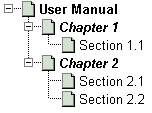
The following code sample creates a two-page document with a 6-item outline. The outline items (except the top-level one) point to various locations within the document. The outline hierarchy is organized as follows:
// Create empty document
PdfDocument objDoc = objPdf.CreateDocument();
// Add new pages
PdfPage objPage1 = objDoc.Pages.Add();
PdfPage objPage2 = objDoc.Pages.Add();
// Make document fit window and show outlines
objDoc.OpenAction = objPage1.CreateDest();
objDoc.PageMode = pdfPageMode.pdfUseOutlines;
// Select one of the standard PDF fonts
PdfFont objFont = objDoc.Fonts["Helvetica"];
// Param string
string strParams = "x=0; y=650; width=612; alignment=center; size=50";
// Draw text on page
objPage1.Canvas.DrawText( "Page 1", strParams, objFont );
objPage2.Canvas.DrawText( "Page 2", strParams, objFont );
// Build outline hierarchy
PdfOutline objOutline = objDoc.Outline;
PdfOutlineItem objTitle = objOutline.Add("User Manual",
null, null, null, "Bold=true");
PdfOutlineItem objChapter1 = objOutline.Add("Chapter 1",
objPage1.CreateDest(), objTitle, null, "Bold=true; Italic=true");
PdfOutlineItem objSection11 = objOutline.Add("Section 1.1",
objPage1.CreateDest("XYZ=true;Zoom=2;Top=300"), objChapter1, null );
PdfOutlineItem objChapter2 = objOutline.Add("Chapter 2",
objPage2.CreateDest(), objTitle, null, "Bold=true; Italic=true");
PdfOutlineItem objSection21 = objOutline.Add("Section 2.1",
objPage2.CreateDest("XYZ=true;Zoom=2;Top=500"), objChapter2, null );
PdfOutlineItem objSection22 = objOutline.Add("Section 2.2",
objPage2.CreateDest("XYZ=true;Zoom=2;Top=200"), objChapter2, null );
// Save document, the Save method returns generated file name
string strFilename = objDoc.Save( Server.MapPath("outline.pdf"), false );
' Create empty document
Dim objDoc As PdfDocument = objPdf.CreateDocument()
' Add new pages
Dim objPage1 As PdfPage = objDoc.Pages.Add()
Dim objPage2 As PdfPage = objDoc.Pages.Add()
' Make document fit window and show outlines
objDoc.OpenAction = objPage1.CreateDest()
objDoc.PageMode = pdfPageMode.pdfUseOutlines
' Select one of the standard PDF fonts
Dim objFont As PdfFont = objDoc.Fonts("Helvetica")
' Param string
Dim strParams As String = "x=0; y=650; width=612; alignment=center; size=50"
' Draw text on page
objPage1.Canvas.DrawText( "Page 1", strParams, objFont )
objPage2.Canvas.DrawText( "Page 2", strParams, objFont )
' Build outline hierarchy
Dim objOutline As PdfOutline = objDoc.Outline
Dim objTitle As PdfOutlineItem = objOutline.Add("User Manual", _
Nothing, Nothing, Nothing, "Bold=true")
Dim objChapter1 As PdfOutlineItem = objOutline.Add("Chapter 1", _
objPage1.CreateDest(), objTitle, Nothing, "Bold=true; Italic=true")
Dim objSection11 As PdfOutlineItem = objOutline.Add("Section 1.1", _
objPage1.CreateDest("XYZ=true;Zoom=2;Top=300"), objChapter1, Nothing )
Dim objChapter2 As PdfOutlineItem = objOutline.Add("Chapter 2", _
objPage2.CreateDest(), objTitle, Nothing, "Bold=true; Italic=true")
Dim objSection21 As PdfOutlineItem = objOutline.Add("Section 2.1", _
objPage2.CreateDest("XYZ=true;Zoom=2;Top=500"), objChapter2, Nothing )
Dim objSection22 As PdfOutlineItem = objOutline.Add("Section 2.2", _
objPage2.CreateDest("XYZ=true;Zoom=2;Top=200"), objChapter2, Nothing )
' Save document, the Save method returns generated file name
Dim strFilename As String = objDoc.Save( Server.MapPath("outline.pdf"), False )
Note that we set PdfDocument's PageMode property to pdfPageMode.pdfUseOutline to show the outline hierarchy automatically when the document opens.
Click the links below to run this code sample:
10.3 Annotations
An annotation is an interactive object placed on a page, such as a text note or embedded file. PDF includes a wide variety of standard annotation types.
Many of the standard annotations may be displayed in either the open or closed state. When closed, they appear on the page in some distinctive form depending on the specific annotation type, such as an icon, a box or a rubber stamp. When the user activates the annotation by clicking it with the mouse, it exhibits its associated object, such as by opening a pop-up window displaying a text note, or by opening an embedded file in its respective application.
10.3.1 Code Sample
The Annots property of the PdfPage object returns a PdfAnnots collection of PdfAnnot objects representing individual annotations on the page. An annotation is added to a page via the PdfAnnots.Add method.
The following code sample puts a simple text annotation on a one-page document (most of the code omitted for brevity):
PdfAnnot objAnnot = objPage.Annots.Add("This is a simple text annotation.", "x=10, y=700; width=200; height=50" );
...
Dim objAnnot As PdfAnnot = objPage.Annots.Add("This is a simple text annotation.", "x=10, y=700; width=200; height=50" )
...
Click the links below to run this code sample:
The PdfAnnots.Add method takes 4 arguments:
- Contents: Text to be displayed for the annotation, or, if this type of annotation does not display text, an alternative description in human-readable form.
-
Param: A parameter object or parameter string containing a number of required and optional parameters. Parameters common to all annotations are the following:
X, Y, Width, Height (required) - the coordinates of the annotation within a page. All other parameters are optional.
Type - specifies the annotation type. The following constants are defined: text (0, default), link (1), freetext (2), line (3), square (4), circle (5), highlight (6), underline (7), strikeout (8), squiggly (9), stamp (10), fileattachment (11), sound (12), movie (13), widget (14), screen (15) and richmedia (16).
Open - (false by default) specifies whether an annotation is to be shown in the open or closed state.
Color - specifies the annotation color.
Border - specifies border width of the annotation. 1 by default. Set this parameter to 0 to remove the annotation's border.
BorderRadius - defines the shape of border corners. 0 by default which means regular square corners.
Invisible - if set to True, the annotation is not displayed. False by default.
Hidden - if set to True, the annotation is not displayed or printed, and no interactions with the user is allowed. False by default.
Print - if set to True, the annotation will be printed along with the rest of the page. Otherwise, it won't be printed. False by default.
NoZoom - if set to True, the annotation's appearance does not change when the page is zoomed in or out. False by default.
NoRotate - if set to True, the annotation does not rotate when the page is rotated. False by default.
NoView - same as Hidden, but the annotation may be printed depending on the Print parameter. False by default.
ReadOnly - if set to True, the annotation is not allowed to interact with the user. False by default.
AutoPlay - (used with screen annotations only): if set to True, the embedded movie starts playing automatically. False by default.
- Name: An optional text string. The meaning of this argument depends on the particular annotation type and will be described below.
- Path: An optional file path string. This argument is only used for file attachment and screen annotations and ignored otherwise.
-
Text Annotations
A text annotation represents a "sticky note" attached to a point in the PDF document. When closed, the annotation appears as an icon, when closed it displays a pop-up window containing the text of the note.
The Name argument of the PdfAnnots.Add method controls the type of an icon used in displaying the annotation and can be set to the following values: "Note" (default), "Comment", "Key", "Help", "NewParagraph", "Paragraph", "Insert".
See Section 10.3.1 for a code sample.
-
Link Annotations
A link annotation represents either a hypertext link or a destination elsewhere in the document. A link annotation has to be assigned an action or destination.
The Type parameter must be set to link (1). This type of annotation accepts an additional parameter, HighlightMode, which specifies the visual effects to be used when the button is pressed or held down inside its active area. The possible values are 0, 1 (default), 2, 3 meaning none, invert, outline or push, respectively.
The following code fragment displays a hyperlink. Actions are described below.
objPage.Canvas.DrawText( "www.persits.com", "x=1;y=712;color=blue", objDoc.fonts["Courier"] );
PdfAnnot objAnnot = objPage.Annots.Add("", "Type=Link; x=1, y=700, width=100, height=10; Border=0");
objAnnot.SetAction( objDoc.CreateAction("type=URI", "http://www.persits.com") );As of Version 3.7.0.35014, the URL or page number a link annotation on an existing document is pointing to can be obtained via the property PdfAnnot.Contents. If the annotation points to a URL, this property returns a string such as "##URI=https://www.persits.com", and if it points to another page within this document, the property returns a string such as "##Page=3".
-
Free Text Annotations A free text annotation displays text directly on the page. Unlike an ordinary text annotation, a free text annotation has no open or closed state. Its text is always visible.
The Type parameter must be set to freetext (2). This type of annotation accepts an additional parameter, Alignment, which controls text alignment. Possible values are left (0, default), right (1) and center (2).
-
Line Annotations
A line annotation displays a single straight line on the page. When opened, it displays a pop-up window containing the text of the associated note.
The Type parameter must be set to line (3). This type of annotation accepts additional parameters:
X1, Y1, X2, Y2 (required) - the line's starting and ending coordinates in the default user space.
InnerColor (optional) - the line color.
Beginning, Ending (optional) - controls the line's ending style. Values are 0 (none, default) 1 (square), 2 (circle) 3 (diamond), 4 (open arrow), 5 (closed arrow).
LineWidth (optional) - the line width (1 by default).
LineStyle (optional) - the line style. Values are 0 (solid) and (1-dashed). If LineStyle is set to 1, also accepts Dash1 and Dash2 parameters to define the dash pattern. -
Square and Circle Annotations
Square and circle annotations display a rectangle or circle on the page, respectively. The rectangle or circle is inscribed within the annotation's rectangle defined by the x, y, width and height parameters.
The Type parameter must be set to square (4) or circle (5). Additional parameters are InnerColor, LineWidth, LineStyle, Dash1, and Dash2 (see Line Annotations for descriptions).
-
Highlight, Underline, Strikeout and Squiggly Annotations
These are also referred to as Markup annotations. Markup annotations appear as highlights, underlines, strikeouts, or jagged (squiggly) underlines in the text of a document. When opened, they display a pop-up window containing the text of the associated note.
The Type parameter must be set to highlight (6), underline (7), strikeout (8), or squiggly (9). Additional parameters are X1, Y1, X2, Y2, X3, Y3, X4, Y4 specifying the coordinates of a quadrilateral encompassing a word or group of contiguous words in the text underlying the annotation.
-
Rubber Stamp Annotations
A rubber stamp annotation displays text or graphics intended to look as if they were stamped on the page with a rubber stamp. When opened, they display a pop-up window containing the text of the associated note.
The Type parameter must be set to stamp (10). The Name argument of the PdfAnnots.Add method specifies an icon type to be used in displaying the annotation. The possible values are: "Approved", "Asis", "Confidential", "Departmental", "Draft" (default), "Experimental", "Expired", "Final", "ForComment", "ForPiblicRelease", "NotApproved", "NotForPublicRelease", "Sold" and "TopSecret".
-
FileAttachment Annotations
A file attachment annotation contains a reference to a file embedded in the PDF document. For example, a table of data might use a file attachment annotation to link to a spreadsheet file based on that data. Activating the annotation will extract the embedded file and give the user an opportunity to view it or save it on disk.
The Type parameter must be set to fileattachment (11). The Name argument of the PdfAnnots.Add method specifies an icon type to be used to display the annotation. Possible values are "Graph", "Paperclip", "PushPin" (default) and "Tag".
The Path argument of the PdfAnnots.Add method specifies a file to be associated with the annotation.
The following code fragment creates a file attachment annotation:
PdfAnnot objAnnot = objPage.Annots.Add("", "x=1,y=700; width=10; height=10; Type=FileAttachment", "Paperclip", @"c:\path\file.txt");As of Version 3.7, two more parameters have been added to the Add method for PDF/A-3 compliance. These parameters are:
- Names (Boolean). If set to True, the new FileAttachment annotation is added to the document catalog's Names array instead of the Annots array, where it would normally reside. This is a PDF/A-3 requirement.
- AF (Integer) - stands for "associated files relationship". This parameter is responsible for adding the AFRelationship entry to the file annotation object, which is yet another PDF/A-3 requirement. The AF value can be one of the following: 0 (Source), 1 (Data), 2 (Alternative), 3 (Supplement), 4 (Unspecified), 5 (EncryptedPayload) and 6 (None).
For more information on the Names and AF parameters, see Section 14.3.4 - PDF/A-3 Compliance.
-
Screen Annotations
Screen annotations (introduced in Version 3.4.0.31179) are useful for embedding video clips in a PDF page. A screen annotation is created similarly to a file attachment annotation described above, by passing the path to the video file as the 4th argument to the PdfAnnots.Add method.
The Type parameter must be set to screen (15). The Contents argument of the PdfAnnots.Add method becomes the name of the movie being embedded. The Name argument of the PdfAnnots.Add method becomes the name of the rendering object (per PDF specifications) and its value is arbitrary. The Path argument of the PdfAnnots.Add method must point to the video file being embedded.
The screen annotation currently recognizes one additional parameter that is specific to this annotation: AutoPlay. If this parameter is set to True, the video starts playing automatically when it becomes visible in the PDF viewer.
The following code fragment creates a screen annotation:
PdfAnnot objAnnot = objPage.Annots.Add("My little movie", "x=10, y=300; width=450; height=300; Type=screen; AutoPlay=true", "Movie", @"c:\path\movie.avi"); -
Rich Media Annotations
Rich Media annotations (introduced in Version 3.6) embed 3D objects, Flash, video and audio files in a PDF document. These annotations are similar to file attachment annotations described above, but support additional parameters pertaining to various aspects of rich media appearance. Rich media annotations are documented in Adobe Supplement to the ISO 32000 available online.
- The Type parameter must be set to richmedia (16). The required Subtype parameter must be set to 0 (3D), 1 (Flash), 2 (Sound), or 3 (Video).
- The Contents argument of the PdfAnnots.Add method becomes the name of the rich media file being embedded.
-
The Name argument of the PdfAnnots.Add method is optional, it can be left empty or specify formatted name/value pairs passed to the Flash player when activated.
These pairs are referred to as FlashVars in the Adobe documentation.
Here is an example of a FlashVars value:
source=videotest.mp4&skin=SkinOverAllNoFullNoCaption.swf&skinAutoHide=true&skinBackgroundColor=0x5F5F5F&skinBackgroundAlpha=0.75&volume=1.00
- The Path argument of the PdfAnnots.Add method must point to the rich media file being embedded.
The following optional parameters are supported:
- Activation - 0 (explicitly activated by user action, default), 1 (annotation is activated when the page receives focus), 2 (annotation is activated when the page becomes visible).
- Deactivation - 0 (explicitly deactivated by user action, default), 1 (annotation is deactivated when the page loses focus), 2 (annotation is deactivated when the page is no longer visible).
- Binding - 0 (None, default), 1 (Foreground), 2 (Background).
- NavigationPane - If set to True, the navigation pane is visible when the content is initially activated. If set to False or omitted, the navigation pane is not displayed by default.
- PassContextClick - If set to False or omitted, the conforming reader handles the context click. If set to True, the conforming reader's context menu is not visible and the user sees the context menu and any custom items generated by the media player run-time.
- Toolbar - If set to True, a toolbar is displayed when the annotation is activated and given focus. If set to False or omitted, a toolbar is not displayed.
- Transparent - If set to True, the rich media artwork is composited over the page content using an alpha channel. If set to False or omitted, the artwork is drawn over an opaque background prior to composition over the page content.
The following code fragment creates a rich media annotation of the subtype Video (3):
PdfAnnot objAnnot = objPage.Annots.Add("Cute Kittens", "x=10, y=300; width=360; height=240; Type=RichMedia; SubType=3; Activation=1", "", @"c:\path\kittens.mp4"); - Other types of PDF annotations are currently not supported.
10.3.4 Changing Default Appearance of Annotations
By default, the way an annotation is displayed on the page is at the discretion of the viewer application. Acrobat Reader 5.0, for example, contains built-in appearances for only a few annotation types, others are displayed as gray boxes with a question mark.
AspPDF enables you to specify an arbitrary appearance (and even a set of appearances) for an annotation via PdfAnnot's Graphics property which can be assigned an instance of the PdfGraphics object described in Chapter 5.
Annot.Graphics is a parameterized property returning or specifying a PdfGraphics object that defines this annotation's appearance. It accepts two arguments, the Type and optional State (the latter is only used in interactive form fields described in Chapter 11.)
In a simple scenario, an annotation only has one ("normal") appearance. An annotation may also have two more optional appearances displayed when the mouse is clicked on, or moved over, the active area, referred to as "down" and "rollover" appearances, respectively. The Type argument specifies the type of appearance. Possible values are: 0 (normal), 1 (down) and 2 (rollover).
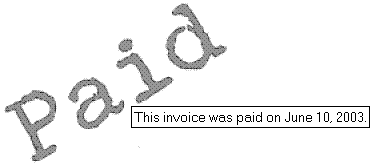
The following code sample creates an annotation of the type Stamp and sets its appearance to an image displaying the word "Paid".
// Create empty document
PdfDocument objDoc = objPdf.CreateDocument();
// Add a new page
PdfPage objPage = objDoc.Pages.Add();
// Add annotation with custom appearance
string strNotice = "This invoice was paid on June 10, 2003.";
PdfAnnot objAnnot =
objPage.Annots.Add(strNotice, "x=10, y=600; width=182; height=131; Type=Stamp");
// Create a graphics object for this annotation containing an image
PdfGraphics objPaidGraph =
objDoc.CreateGraphics("left=0; bottom=0; right=182; top=131");
PdfImage objImage = objDoc.OpenImage( Server.MapPath("paid.gif") );
objPaidGraph.Canvas.DrawImage(objImage, "x=0, y=0");
// Use this graphics object as the annotation's appearance
objAnnot.Graphics[0] = objPaidGraph;
// Save document, the Save method returns generated file name
string strFilename = objDoc.Save( Server.MapPath("appearance.pdf"), false );
' Create empty document
Dim objDoc As PdfDocument = objPdf.CreateDocument()
' Add a new page
Dim objPage As PdfPage = objDoc.Pages.Add()
' Add annotation with custom appearance
Dim strNotice As String = "This invoice was paid on June 10, 2003."
Dim objAnnot As PdfAnnot = _
objPage.Annots.Add(strNotice, "x=10, y=600; width=182; height=131; Type=Stamp")
' Create a graphics object for this annotation containing an image
Dim objPaidGraph As PdfGraphics = _
objDoc.CreateGraphics("left=0; bottom=0; right=182; top=131")
Dim objImage As PdfImage = objDoc.OpenImage(Server.MapPath("paid.gif"))
objPaidGraph.Canvas.DrawImage(objImage, "x=0, y=0")
' Use this graphics object as the annotation's appearance
objAnnot.Graphics(0) = objPaidGraph
' Save document, the Save method returns generated file name
Dim strFilename As String = objDoc.Save(Server.MapPath("appearance.pdf"), False)
Click the links below to run this code sample:
10.4 Actions
An action is a set of instructions or commands the viewer application must carry out in response to a certain event, such a mouse click, document opening, push of a button, etc. Some examples of actions are jumping to another PDF document, playing a sound, launching an application or executing a JavaScript script.
An action is represented by the PdfAction object creatable via PdfDocument's CreateAction method. This method takes two arguments: a parameter object or parameter string specifying the action Type as well as other type-specific parameters, and a string value which has different meanings depending on the action type (and may be ignored altogether by some action types).
The action types currently supported are:
goto (1), gotor (2), launch (3), uri (5), named (9), submit (10), reset (11) and javascript (13).
The GoTo and GoToR actions require that a destination be associated with them, the others are fully defined by the CreateAction arguments.
Once an action object is created, it is usually assigned to an annotation, outline item, or interactive form item (such as a pushbutton) via their respective SetAction methods.
-
GoTo and GoToR Actions
The GoTo and GoToR actions change the view to a specified destination in the same, or a remote, document, respectively. These types of actions require that a PdfDest object be assigned to them via the SetDest method.
The Type parameter must be set to goto (1) or gotor (2).
The following code fragment creates a link annotation and assigns it a GoTo action which in turn is assigned a destination to Page 3:
PdfAction objAction = objDoc.CreateAction("Type=GoTo", "");
objAction.SetDest( objDoc.Pages[3].CreateDest("FitH=true") );
PdfAnnot objAnnot = objDoc.Pages[1].Annots.Add("", "type=link;x=10;y=600;width=200;height=20,border=0");
objAnnot.SetAction( objAction );The GoToR action can be used to jump to an arbitrary page of the remote document:
PdfAction objAction = objDoc.CreateAction("Type=GoToR", "Doc2.pdf");
objAction.SetDest( objDoc2.Pages[3].CreateDest("FitH=true") ); -
Launch Actions
A launch action launches an application or opens a document.
The Type parameter must be set to launch (3). The Value argument of the PdfDocument.CreateAction method should specify a path to the application to be launched or file to be opened. This type of action takes an additional parameter, NewWindow, which, if set to True, opens the destination document in a new window. If this parameter is set to False (default value), the destination document will replace the current document in the same window.
The following code fragment creates a pushbutton and makes it launch another PDF file. Pushbuttons are covered in the next chapter.
PdfAction objAction = objDoc.CreateAction("Type=launch; NewWindow=true", "abc.pdf");
PdfAnnot objAnnot = objPage.CreatePushbutton("btn", "Open file!", "x=10; y=600; width=200; height=50", font, null);
objAnnot.SetAction( objAction ); -
URI Actions
A uniform resource identifier (URI) is a string that identifies a resource on the Internet -- typically a file (HTML or otherwise), query, or some other entity. A URI action causes a URI to be resolved.
The Type parameter must be set to uri (5). This type of action accepts an additional parameter, IsMap, which, if set to True, causes the mouse position to be tracked when the URI is resolved. Mouse coordinates are added to the URI, separated by commas and preceded by a question mark, as follows:
http://www.someaddress.com/file.htm?100,200
A URI action code sample can be seen in Section 10.3.3 under Link Annotations.
-
Named Actions
Currently, PDF viewer applications support the following named actions:
NextPage - Go to the next page of the document;
PrevPage - Go to the previous page of the document;
FirstPage - Go to the first page of the document;
LastPage - Go to the last page of the document.
The Type parameter must be set to named (9). and the Value argument of the PdfDocument.CreateAction method should specify the action name. This argument is case-sensitive. For example:
PdfAction objAction = objDoc.CreateAction("Type=named", "NextPage");
-
Submit Actions
Submit actions are used with interactive forms. A submit action submits the interactive form to the specified URL.
The Type parameter must be set to submit (10), and the Value argument specifies the submit URL. This type of action accepts the following optional Boolean parameters:
HTML - if set to True, the form data is submitted in HTML format. If set to False, the form is submitted in Form Data Format (FDF). False by default.
Get - if set to True, the form is submitted using the GET method. If set to False, the form is submitted using the POST method. This parameter is only meaningful if HTML is set to True. False by default.
Coordinates - if set to True, the coordinates of the mouse relative to the upper-left corner of the submit button annotation are submitted as part of the form data. This parameter is only meaningful if HTML is set to True. False by default.
XML - if set to True, the form is submitted in XML format. If set to False, the form is submitted in either HTML or FDF format depending on the HTML parameter. False by default.
IncludeAppend - if set to True, the submitted FDF file includes the contents of all incremental updates. This parameter is only meaningful if both HTML and XML parameters are set to False. False by default.
IncludeAnnots - if set to True, the submitted FDF file includes all annotations in the underlying PDF document. This parameter is only meaningful if both HTML and XML parameters are set to False. False by default.
PDF - if set to True, the form is submitted in PDF format using the MIME content type application/pdf. If this parameter is set to True, all other parameters, except Get, are ignored. False by default.
For more information, see Chapter 11 - Forms.
-
Reset Actions
Reset actions are used with interactive forms. A reset action resets the current interactive form by setting all form fields to their respective default values.
The Type parameter must be set to reset (11), and the Value argument is ignored.
For more information, see Chapter 11 - Forms.
-
JavaScript Actions
A JavaScript action executes an arbitrary JavaScript script.
The Type parameter must be set to javascript (13). and the Value argument of the PdfDocument.CreateAction method specifies the actual JavaScript code. For example:
PdfAction objAction = objDoc.CreateAction("type=JavaScript", "this.print(true)");

